Did rent come in — and what needs you?
DoorWorth opens on the answer: this month's rent, a short list of what needs you, and four numbers you can tap to see the math. Ask DoorWorth reads the documents in your vault and fills things in only when you tap. On iPhone and in your browser — one account. Every figure comes from your own data; anything estimated says (est.).
Open the app. Know where you stand.
Home answers the two questions landlords open an app to ask: did rent come in, and what needs me?
Rent this month
How much has come in against what's expected — who has paid, who's partial, who's due, and what's on the way (est.). A tenant with no rent on file is left out, never counted as $0.
Needs you
One list, most urgent first: leases ending, payments waiting on your confirm, bank transactions to review, possible duplicates, dates coming up in the next 14 days, vacancies, and facts found in your documents. When nothing needs you, it says exactly that.
Four numbers, with the math
Equity (est.), cash flow after fixed costs (before repairs & vacancy), cash + credit available, and this year's net. Tap ⓘ on any of them to see how it's figured. Cash + credit appears once you've added a financing source.
One assistant. It reads your documents — you decide what gets filled in.
Ask from any screen. It answers from your own records, shows where each fact came from, and changes nothing until you tap.
- Reads your documents — after you say yes. On a property's Records tab, tap Fill in from my documents and confirm. It reads the inspection reports, insurance declarations and leases in that property's vault.
- Every fact shows its source. The field, the value, the document, the page and a short quote — so you can check it before anything is saved.
- Fills in only when you tap. Fill it in or Not this, one fact at a time, with Undo. A field that already has a value shows Currently X → Found Y before you replace it.
- Say it to log it. “Log a $40 water bill on Gilbert” — you see exactly what it will create, then confirm. Ask for a reply to a tenant's message; nothing is sent until you tap Send.
- Ask “how do I…” and get the steps with a button that takes you there — or tap Show me around for a tour. Scripted how-to answers don't use up a question.
Cited facts, not advice. Ask DoorWorth explains your numbers and where they come from. It doesn't give legal or tax advice — for those, confirm with your CPA or attorney.
Allowances. Free: 10 questions a month and 5 pages of document reading to try. Plus: 40 messages a day and up to 75 pages a month; Pro: 100 messages a day and up to 250 pages. Messages reset each day; each page counts once, and you see how many are left before you confirm.
Five places. Everything has one home.
Home · Properties · Tenants · Money · Ask DoorWorth — the same five on the web and on your iPhone. Settings and sign-out live in the account menu.
Home
Rent this month, Needs you, and four numbers with the math. All dates opens the full calendar.
Properties
Every house on one list, with your Passport and Insurance counts above it. Each property has five tabs: Overview · Tenants · Money · Upkeep · Records (Property Passport, Insurance, Vault, Photos, Timeline).
Tenants
Tenants & leases · Messages from your tenant portal · Rent payments, this month and each bank payment's status.
Money
Activity · Bank Sync · Plan ahead · Buy next (financing, buying power, Find deals) · Taxes & reports.
Ask DoorWorth
The assistant, one tap from every screen — one conversation that follows you around, kept on your device.
One account. iPhone and any browser.
DoorWorth is a native iPhone app and a full web app at doorworth.app. Sign in on either and it's the same portfolio, kept in sync both ways — a big screen at your desk, your phone in the field.
Edit anywhere, synced both ways
- Add & edit anything — log rent, add receipts, tenants, work orders, photos & documents right in the browser
- It shows up on your phone — and phone edits show up on the web
- Same numbers on both — it's the same portfolio, synced both ways
- Two logins, one place — a Landlord Login for you and a Tenant Login for your renters
On Android? DoorWorth is on Google Play — and the web app runs in any Android browser too.
Open the web app →A few extras are iPhone-only today
- Scanning closing documents into a new property
- Automatic GPS mileage — you can log miles by hand on either
- Face ID lock
A real native app and the full app in any browser, sharing one live portfolio. What makes DoorWorth different is what it combines: find the deal, run the doors, and show your work — the same honest math on every screen.
Built to manage the money, not just the doors.
From the first time you size up a deal to the day you sell — DoorWorth is the command center for your whole portfolio.
Every property, at a glance
Live equity, cash flow, ROI, and appreciation — per property and portfolio-wide. Add one by hand, import a spreadsheet, or — in the iPhone app — scan your closing docs and let DoorWorth read the price, value, and taxes.
Ask DoorWorth
One assistant for the whole app: ask about your numbers, log a bill just by typing it, draft a reply to a tenant, or have it read a property's documents and suggest entries. Plus adds a weekly brief of what needs attention. It reads only when you say so and changes nothing until you tap.
Automatic bank sync
Securely connect your bank through Plaid. Transactions import on their own into a queue you review, ready to file as rental income or a property expense. Your bank login stays with your bank.
PlusCollect rent your way
Free: send a rent request with your Venmo, PayPal, Cash App, or Zelle handle — copy it, text it, or email it. Plus: invite tenants to their own portal to pay, message you, and report maintenance, and take bank transfers (ACH) with autopay, automatic receipts, and automatic late-fee notices.
Know where the rent lands
The bank-payments hub shows exactly which account rent deposits go to, every recent deposit with Stripe's own arrival dates, and a secure Stripe page to change the payout account — with an instant alert any time it changes, and one whenever a new device signs in.
PlusTenants, leases & screening
Track leases and deposits with renewal reminders — free — and send a fillable application. E-sign the lease from the web or the iPhone app (Plus), which can even generate the lease PDF for you. Screening is a hand-off: the applicant completes the credit & background check with TransUnion SmartMove and pays TransUnion directly. Start one from the iPhone app or the web app; reviewing status, the pre-decline safety check, and the adverse-action letter work on both.
Property Passport
A living, provable history for every house — systems, improvements, service history, paint codes, permits — built from records you already keep and documents you approve, and shareable as a read-only link or PDF. Find it under a property's Records tab. Like a Carfax for your property.
PlusInsurance Ready
The 12 documentation items insurers commonly ask about, tracked per property — roof, HVAC, and water-heater ages fill in from your own records, the rest take one photo each, and with your OK Ask DoorWorth can attach the document that shows an item — plus a policy vault with renewal reminders. Counts and dates, never a made-up risk score.
PlusPlan ahead, on real balances
Label real balances into CapEx, tax, and vacancy reserves; see a dated 30–60 day cash-flow forecast; get flagged when a recurring charge creeps up. On Pro, run Second Look to sweep your bank history for deductions your books missed, and a Stress Test to see cash flow if rents fall. Labels and detection only — your money never moves.
Plus & ProFind deals
Search any city, state, or a radius around any place — nationwide. Every listing is underwritten at your terms, and you can search HUD foreclosures right alongside. Find it under Money → Buy next.
ProTax-ready all year
Real IRS-convention depreciation schedules, repair-vs-improvement tracking, placed-in-service handling, a passive-loss reality check, 1099 contractor tracking (the IRS forms for contractors you pay), and a Schedule E–style package (the IRS rental-income form) for your CPA — organized as you go under Money → Taxes & reports, never guessed.
Export everything
Download this year's transaction CSV, Schedule E, Tax Package, and mileage log, plus your vault documents and condition-report photos — as a set of files with a manifest that honestly lists anything that couldn't be fetched. Your data, always free.
Show 14 more featuresShow fewer features
Document vault & security
A vault and photos for every property, a Face ID lock on iPhone, cloud sync across your devices, and optional two-factor security. Ask DoorWorth can read what's in the vault — only when you say so.
Turnover tracker
A vacant unit shows its whole turnover live — days vacant, estimated rent missed, and the exact cost — stitched from the move-out report, work orders, and receipts you already log. Nothing counted twice.
ProKnow your buying power
Track HELOCs (home equity lines of credit), loans, and cash in one place and see exactly how much you can still borrow and buy — it shows on Home as cash + credit available. Loan balances update themselves between statements — labeled estimates, your statement always wins.
Proof when it matters
Timestamped move-in and move-out condition reports, plus a correspondence log for every call and letter with housing authorities, insurers, or contractors — each exportable as a dispute-ready PDF.
Evidence Binder
One tap assembles a dispute-ready packet — lease, ledger, notices, condition reports, and messages for court, or systems, checklist, photos, and receipts for an insurance claim. Verbatim records only, nothing summarized or invented.
PlusReady-to-send letters
Six built-in courtesy notices — rent reminders, late-rent follow-up, renewal cover, notice of entry, move-out expectations, utility interruption — plus your own attorney-reviewed templates and the security-deposit return letter, all state-deadline aware.
Periodic inspections
Schedule recurring walkthroughs — every 6 months, say — and build a dated, photo-backed record between move-in and move-out, not just at the ends.
A portal link for your vendor
Send any vendor a no-account link for a work order — they accept it, upload photos, and submit an invoice, which stages straight to your Inbox and feeds your 1099 trail when you book it.
Your listings, one link
Publish a clean public page with all your available rentals — photos, rents, and an application link — and share one URL anywhere. No website builder required.
BRRRR & flip projects
BRRRR = Buy, Rehab, Rent, Refinance, Repeat. Track each stage — buy → rehab → refi/sale → rental — with stage chips and day counts — free. Pro adds the analysis: a holding-cost clock, budget vs actual by trade, refi-readiness, and a Flip-or-Hold verdict from your own entries.
ProEntity grouping
Group properties under an LLC or other entity — rolled-up value, debt, equity, and cash flow, a per-entity Schedule E for your CPA's Form 8825 prep (the IRS rental form for partnerships and multi-member LLCs), and owner-distribution math by percentage.
ProAdd a partner
Invite your spouse or partner with their own login; every entry shows who logged it. Bookkeeper and CPA logins are view-only — your bank, payments, and AI tools stay owner-only either way.
PlusNever miss a date
Every loan payment, insurance renewal, tax date, and lease ending in one calendar view (Home → All dates), not just a list — with reminders before they arrive.
Switch in minutes
Coming from TurboTenant, TenantCloud, or a spreadsheet? Import properties, tenants, and rent-payment history from their CSV exports — everything previewed before it's created, blanks kept blank, nothing ever guessed.
How switching works →
Set up in minutes.
No spreadsheets to build, no accounting degree required.
Add your properties
Type them in or import a spreadsheet (CSV). On iPhone you can also scan a closing document.
Connect your bank
Link accounts through Plaid (Plus) so income and expenses land in a queue you review — no retyping.
Open Home
See this month's rent, what needs you, and four numbers — each with the math behind it.
Ask DoorWorth
Let it read a property's documents and suggest entries. You approve each one.
Find your next deal
Search nationwide for cash-flowing properties, underwritten at your terms (Pro).
Once you're in: setting up your portfolio.
A quick walkthrough of the first things to do inside DoorWorth. Do it on your phone or on the web — everything syncs both ways, so it's always the same portfolio.
1Add your first property
2Make your numbers real
3Let Ask DoorWorth read a document
4Connect your bank (optional)
5Set your financing & buying power
6Add tenants & leases
7Invite tenants to their own portal
8Find your next deal
9At tax time
Prefer to do it on a big screen? All of this runs the same at your web login — same portfolio, same numbers (document scanning and starting a screening are iPhone-app extras).
Find your next deal, with the math done.
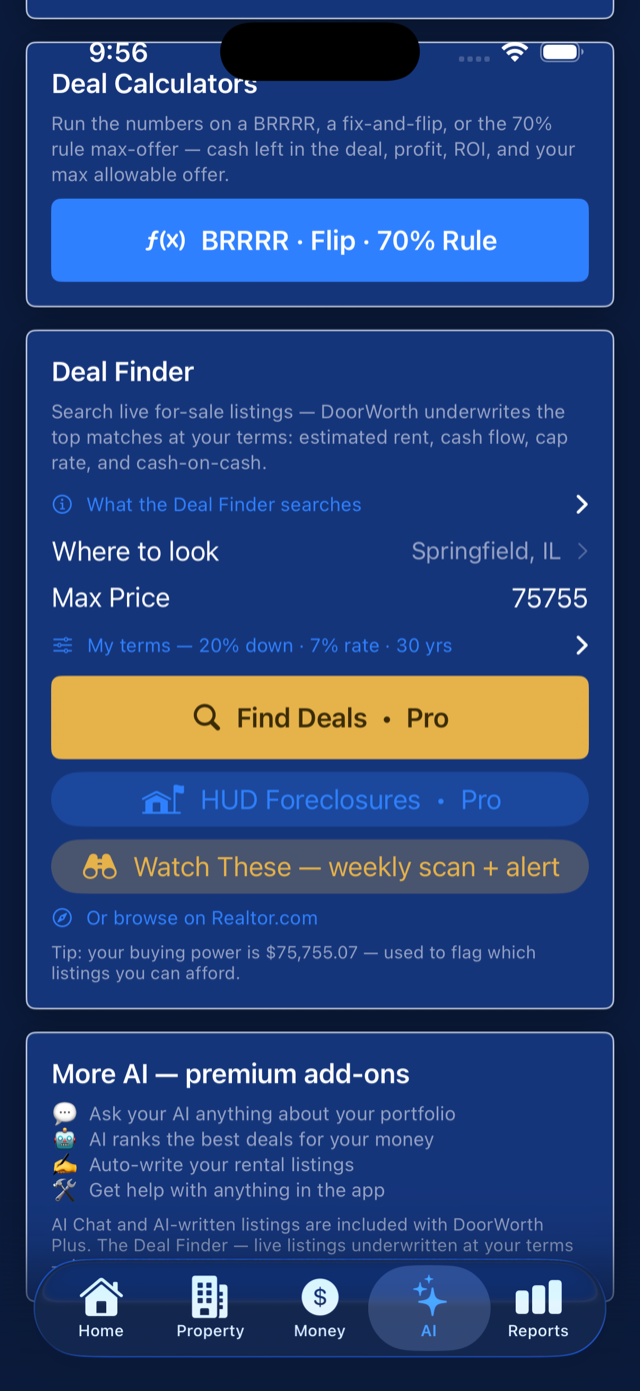
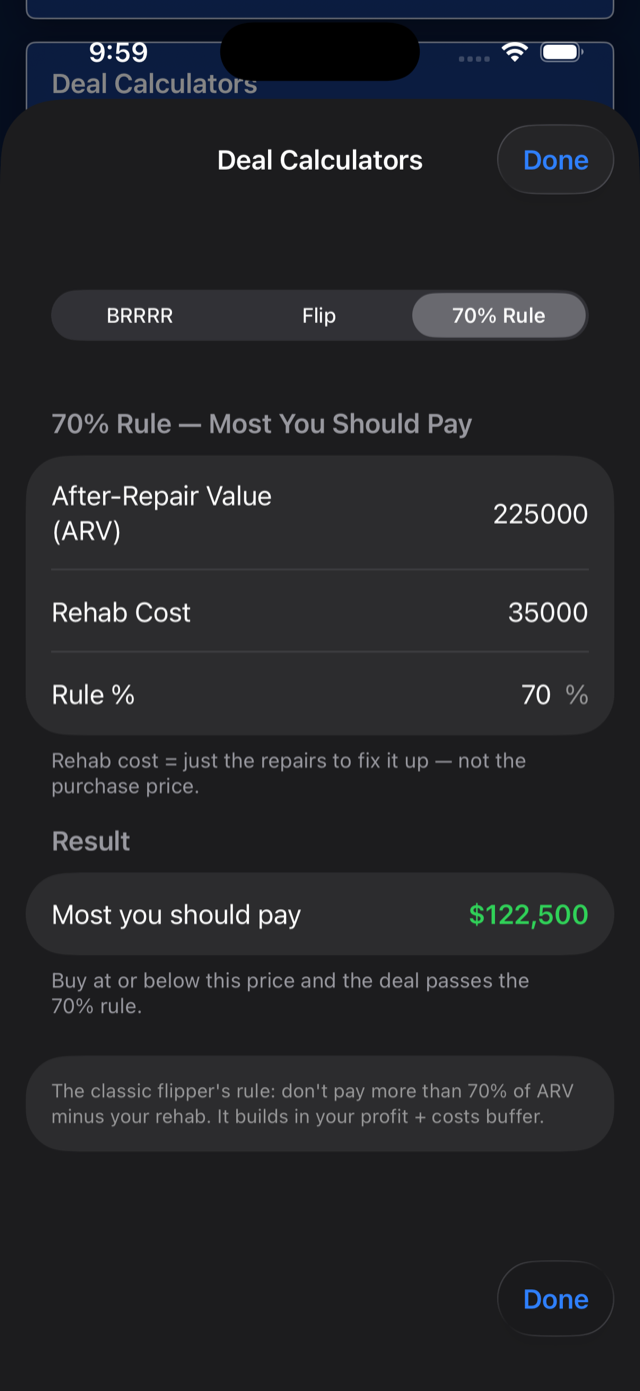
Search anywhere in the country, underwrite every listing at your terms, and know the most you should ever pay. A Pro feature, under Money → Buy next.
- Nationwide search — any city, state, or a radius around any place
- Underwritten at your terms — projected cash flow, cap rate, cash-on-cash, and the 1% rule (does monthly rent reach 1% of the price?)
- HUD foreclosures — searchable right next to regular listings
- An instant Deal Brief for any address — estimated value, rent, and comps (iPhone app)
- A Max-Bid built for auctions — the most you should pay and still hit your numbers
They get their own portal, too.
Invite a tenant (Plus) and they get a private page — no app to download. Everything they do flows back to the right property automatically.
- Pay rent — by bank (ACH) with optional autopay, or Venmo, PayPal, Cash App, Zelle
- Message you — one simple thread, no more lost texts
- Report maintenance — with a photo or a short video, logged straight to the property
- Nothing to install — it's a web link they open like an app
Real numbers, beautifully clear.
Every screen is built to make your money obvious at a glance.
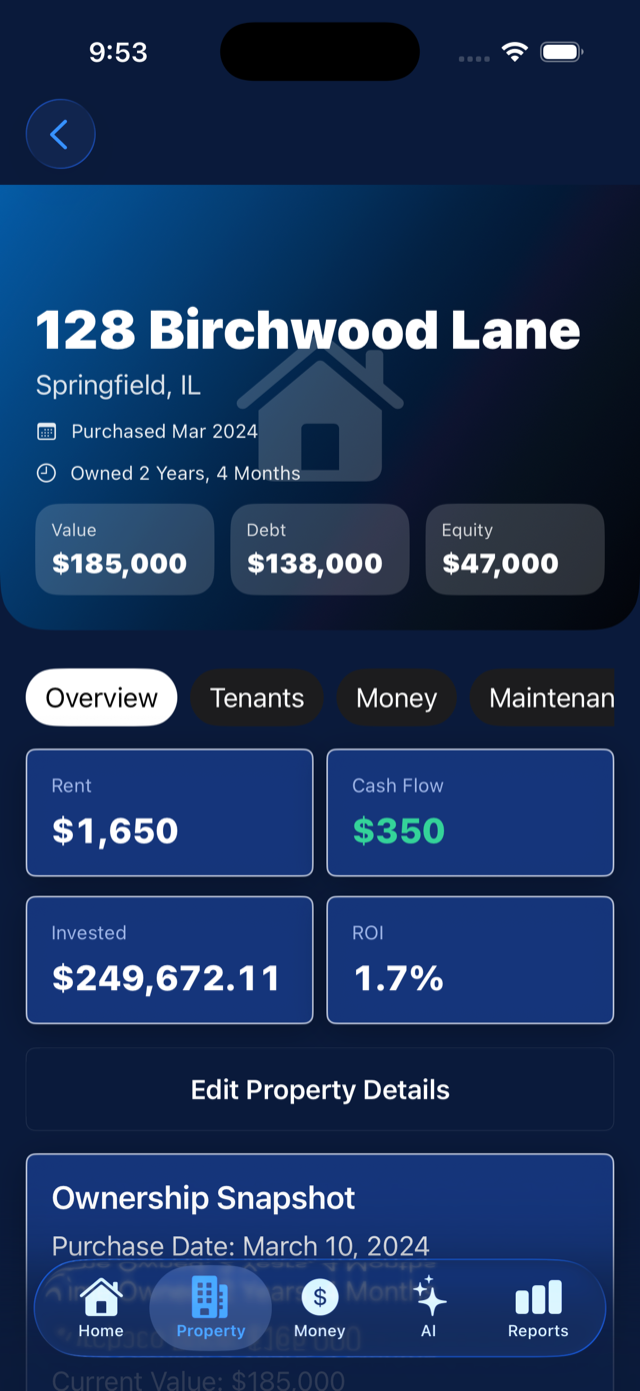
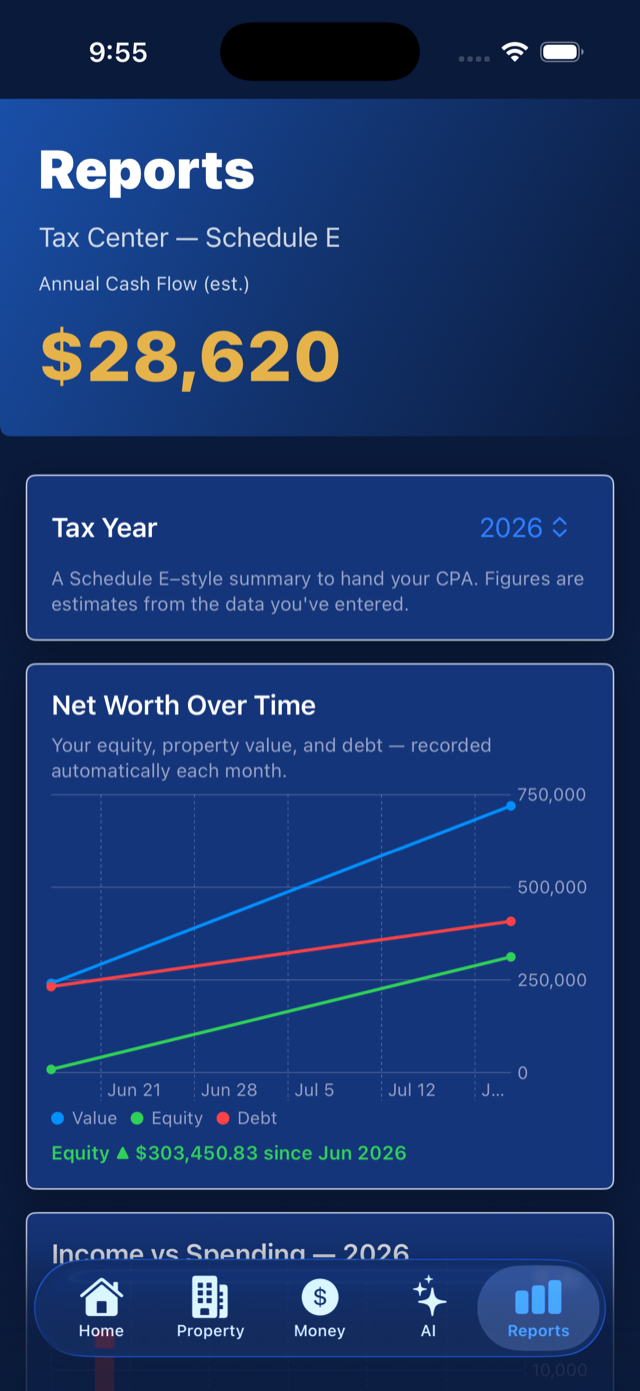
iPhone app screenshots, sample portfolio.
Get going in minutes.
Step-by-step for the things you'll do most.
➕ Add your first property
- Open Properties, tap “+ Add a property”
- Enter it, import a CSV, or scan your closing doc (iPhone)
- Confirm the price, value & taxes
🧾 Add a receipt
- On a property, tap Money → Add receipt
- On iPhone, snap a photo — it reads vendor & amount
- Pick the tax category and save
💵 Collect rent
- Send a rent request with your Venmo, PayPal, Cash App or Zelle handle — free
- Or (Plus) invite the tenant to their portal to pay by bank (ACH, autopay optional)
- The payment logs to that property — see it under Tenants → Rent payments
🔎 Find a deal
- Open Money → Buy next → Find deals (Pro)
- Set your down payment & rate
- Review cash flow, cap rate & max bid
Rent collection is table stakes. Here's what else is built in.
Everything below is in DoorWorth today — the plan each needs is on the card.
An assistant that knows your whole portfolio
Ask DoorWorth answers questions across your whole portfolio from your live numbers — your cash flow, your leases, your dates.
Find deals, underwritten at your terms
Search any city, state, or radius and see every listing underwritten at your down payment and rate: projected cash flow, cap rate, cash-on-cash, and the 1% rule.
ProHUD foreclosure search
Search HUD foreclosures from the same Find deals page as regular listings.
ProMax-Bid
Listings from Find deals (Pro) show a Max-Bid: the most you should pay and still hit your numbers — the figure to hold to when a property goes to auction.
Property Passport
A provable history for every house — systems, improvements, service history, paint codes, permits — shareable as a read-only link or PDF.
PlusInsurance documentation checklist
The 12 items insurers commonly ask about, tracked per property — roof, HVAC, and water-heater ages fill in from your own records.
PlusTurnover cost & days vacant
A vacant unit shows days vacant, estimated rent missed, and the exact cost — stitched from the move-out report, work orders, and receipts you already log.
ProReserve buckets & a 30–60 day forecast
Label real balances into CapEx, tax, and vacancy reserves and see a dated 30–60 day cash-flow forecast. Labels and projections only — your money never moves.
PlusBRRRR & Flip-or-Hold analysis
A holding-cost clock, budget vs actual by trade, refi-readiness, and a Flip-or-Hold verdict — all from your own entries.
ProEvidence Binder
One tap assembles a dispute-ready packet from your own records — for court or for an insurance claim. Verbatim records only, nothing summarized or invented.
Plus“Why not just use the free one?”
Fair question — some landlord apps are free, and free is a fine place to start. DoorWorth's core tracking is free too, forever: properties, equity, cash flow, receipts, rent, taxes, tenants and leases.
The paid plans add what you'd otherwise do by hand: bank sync that queues your transactions, a tenant portal with bank payments, an assistant that reads your documents (40 messages a day on Plus, 100 on Pro) — and, on Pro, help finding and underwriting your next property, with the most you should ever bid.
Rent coming in is the start. DoorWorth also shows what your portfolio is worth, how much you can still borrow, and what a deal would do to your cash flow. A single good deal can be worth more than years of subscription fees.
Start free. Add the paid parts only if you use them.
Start free. Upgrade when you're ready.
Core tracking is free forever. Subscriptions renew automatically and can be cancelled anytime in Settings. One subscription covers the iPhone app and the web.
Free
- Unlimited properties
- Equity, cash flow & ROI
- Receipts, rent & expenses
- Tax & mileage reports
- Tenants & leases
- Rent requests with your Venmo, PayPal, Cash App or Zelle handle
- Document vault (Face ID lock on iPhone)
- Cloud sync & backup
- Ask DoorWorth — 10 questions a month
- Document reading — 5 pages to try
- Export everything — always free
- Not included: Find deals
Plus Recommended
- Everything in Free
- Ask DoorWorth — 40 messages a day
- Document reading — up to 75 pages a month
- Bank sync (Plaid)
- Tenant portal & bank payments (ACH) with autopay
- E-sign leases
- Evidence Binder (court & insurance packets)
- Property Passport & Insurance Ready
- Reserve buckets, 30–60 day forecast & cost-creep alerts
- Invite a partner — their own login
- Not included: Find deals, HUD foreclosures, Second Look & Stress Test
Pro
- Everything in Plus
- Ask DoorWorth — 100 messages a day
- Document reading — up to 250 pages a month
- Nationwide Find deals
- HUD foreclosures
- Deal Brief (iPhone app) & Max-Bid calculator
- Underwriting at your terms
- Weekly new-deal alerts
- BRRRR project analysis (flip-or-hold)
- Turnover tracker
- Entity grouping & per-entity Schedule E
- Second Look deduction sweep & Stress Test
Rent collection by bank (ACH): a $5 bank transfer fee applies per payment, paid by the tenant unless you choose to cover it in Settings — the tenant sees the exact total before paying, and DoorWorth takes no cut of the rent. Stripe charges a fee on every bank transfer, capped at $5; DoorWorth charges a flat $5. Sending a rent request with your Venmo, PayPal, Cash App, or Zelle handle is free on every plan.
Tenant screening is a hand-off to TransUnion SmartMove: the applicant completes the check and pays TransUnion directly, so it isn't billed through your DoorWorth subscription. Start a screening from the iPhone app or the web app — reviewing status, the pre-decline safety check, and the adverse-action letter work on both.
Document reading: each page read counts once against your allowance, and you see how many pages are left before you confirm.
Ask DoorWorth: 40 messages a day on Plus, 100 a day on Pro, resets each day. Free accounts include 10 questions a month. An AI-written listing or the weekly brief counts as one message.
One deal pays for it — for years.
If DoorWorth helps you find just one rental that cash-flows…
An illustration, not a prediction — DoorWorth can't promise you'll find a deal or what it will return.
Privacy and security, in plain words.
DoorWorth connects to your bank through Plaid, the secure network behind many finance apps. We never see or store your bank login, and the keys that read your transactions live on secure servers — never on your phone.
Sensitive personal information, like a tenant's SSN during screening, is entered directly with the credit bureau and is never stored by us.
Documents are read only with your OK. When Ask DoorWorth reads a document, the file goes to our AI provider only to pull out the facts you review. We keep those facts — with their page and a short quote — never the document's full text, and we discard Social Security, tax-ID, account, loan, and license numbers it finds. The details are in our Privacy Policy.
Frequently asked.
Is DoorWorth free?
Yes — core tracking is free forever: unlimited properties, equity, cash flow, receipts, rent, taxes, tenants and leases, cloud sync & backup, the document vault, letters, inspections, rent requests with your Venmo, PayPal, Cash App or Zelle handle, 10 Ask DoorWorth questions a month, and 5 pages of document reading to try. Plus replaces the monthly question cap with 40 Ask DoorWorth messages a day (100 on Pro) and adds the weekly brief, bank sync, the tenant portal with bank payments, e-sign, the Evidence Binder, Property Passport, and Insurance Ready; Pro adds Find deals. One subscription covers the iPhone app and the web, and you can cancel anytime in Settings.
What is Ask DoorWorth?
It's the assistant built into DoorWorth — one conversation you can open from any screen. Ask about your numbers, ask “how do I…” and get the steps with a button that takes you there, log a bill or draft a reply to a tenant (you confirm before anything is saved or sent), or have it read a property's documents and suggest entries. Scripted how-to answers and the tour don't use up a question.
Does the AI read my documents?
Only when you say so. Ask DoorWorth can read the documents in a property's vault — an inspection report, an insurance declarations page, a lease. It asks first (“Read 3 documents?”) and shows how many pages are left in your allowance; nothing is read until you confirm. If you turn on automatic reading, it reads only documents you upload from then on. Each fact it finds shows the document, the page, and a short quote, and a field is filled in only when you tap Fill it in — with Undo. Free accounts get 5 pages to try; Plus reads up to 75 pages a month and Pro up to 250. To read a document, the file is sent to our AI provider — see the Privacy Policy.
Is my document text stored?
DoorWorth never keeps a document's full text. It stores only the individual facts you see on screen — the field, the value, the page, and a short quote — so you can review and approve them. Social Security, tax-ID, account, loan, and license numbers found in a document are discarded, not stored. Your original file stays in your vault like any other.
Does DoorWorth give legal or tax advice?
No. Ask DoorWorth gives cited facts — your own numbers, the rules the app shows with their sources, and where each figure comes from. It doesn't tell you what to do about a legal or tax question; confirm those with your CPA or attorney. Estimates are labeled (est.), and DoorWorth is a record-keeping tool that doesn't provide financial, tax, or legal advice.
How does the bank connection work — is it safe?
DoorWorth links your accounts through Plaid, the secure network behind many major finance apps. Your bank login is entered with your bank, not us — we never see or store it. Transactions import automatically into a queue you review, so you don't have to type anything.
Where does my data live?
On iPhone, your portfolio is stored on your device, so the app works even signed out. Sign in and an encrypted copy backs up to the cloud so you can use DoorWorth across your devices — included on every plan. The web app loads the same portfolio when you sign in. Your Ask DoorWorth conversation history stays on the device you used.
What is Find deals?
A nationwide search for investment properties (Pro) — type any city, state, or a radius around a place. Every listing is underwritten at your own down payment and rate to project cash flow, cap rate, and cash-on-cash, and you can search HUD foreclosures too, with a Max-Bid number built for auctions. You'll find it under Money → Buy next.
Do my tenants need to download anything?
No. You send them a private link to their own web portal (inviting tenants is a Plus feature) where they can pay rent, message you, and report maintenance — right from their phone's browser.
How does tenant screening work?
Screening is a hand-off. From an application in the iPhone app or the web app, you start the check with TransUnion SmartMove — the applicant completes the full credit and background check directly with TransUnion and pays TransUnion for it themselves. Their SSN is entered with the bureau and is never stored by DoorWorth. Reviewing status, the pre-decline safety check, and the adverse-action letter work on both too.
Are the numbers estimates?
Every figure comes from what you've entered or connected — nothing is invented. Where a number is an estimate or a projection (like equity, a deal's estimated rent, or a loan balance between statements), it says (est.), and the ⓘ next to it shows how it's figured.
Can I use it for my taxes?
DoorWorth keeps income and expenses organized all year and exports a Schedule E–style summary plus a mileage log you can hand to your CPA (automatic GPS trip capture is iPhone-only; you can log miles by hand on either). It's a record-keeping tool, not tax advice.
What devices does it run on?
iPhone, via the App Store — and the web app runs in any browser at doorworth.app, including on Android, where DoorWorth is also on Google Play. Cloud sync — included on every plan — keeps your portfolio consistent across all of them. A few extras (document scanning, automatic GPS mileage capture, Face ID lock) are iPhone-only today; CSV property import runs on both, and the iPhone version captures a few extra columns.
How do I get support?
Email us anytime at doorworthapp@gmail.com — see the Support section below.
Four rules the app follows.
Written down so you can hold us to them.
Your numbers, not guesses
Every figure comes from what you entered or connected. Anything that's an estimate says (est.), and ⓘ shows the math.
Nothing changes until you tap
Fills from documents, bills you log by typing, and replies to tenants all wait for your OK — and a fill can be undone.
Sources on the record
A fact read from a document shows the document, the page, and a short quote, so you can check it yourself.
Facts, not advice
DoorWorth explains and computes; it doesn't give legal or tax advice. For those, confirm with your CPA or attorney.
Ready when you are.
DoorWorth is on the App Store, and the web app is live. Have a question? Reach out and we'll get you set up.
Questions or ideas? Send them in.
Tell us what's confusing, what's missing, or what you'd love to see. We read and personally reply to every message.
Prefer email?
Reach a real person at doorworthapp@gmail.com — we typically reply within one business day.
Locked out of two-factor?
Email us from your account's email and we'll verify you and remove the lock so you can sign back in.
Enjoying DoorWorth?
App Store reviews help other landlords find DoorWorth. Rate DoorWorth on the App Store.
Built by a landlord, not a lab.
DoorWorth comes from Henderson, Kentucky. Jeremy Hoefling is a lineman for the electrical utility, and he owns and self-manages three rental doors of his own.
He built DoorWorth because the big-city rent software never quite fit a town where rent runs around $1,500 — so he made the tool he needed for his own houses.
He still runs his own rentals on it, every day.